

Migrating from Monolith to Microservices with GKE: Core Concepts
Break free from monolithic constraints: See how GKE transforms your architecture for better scalability, resilience, and team autonomy.
🧱 Migrating from Monolith to Microservices with GKE: Core Concepts
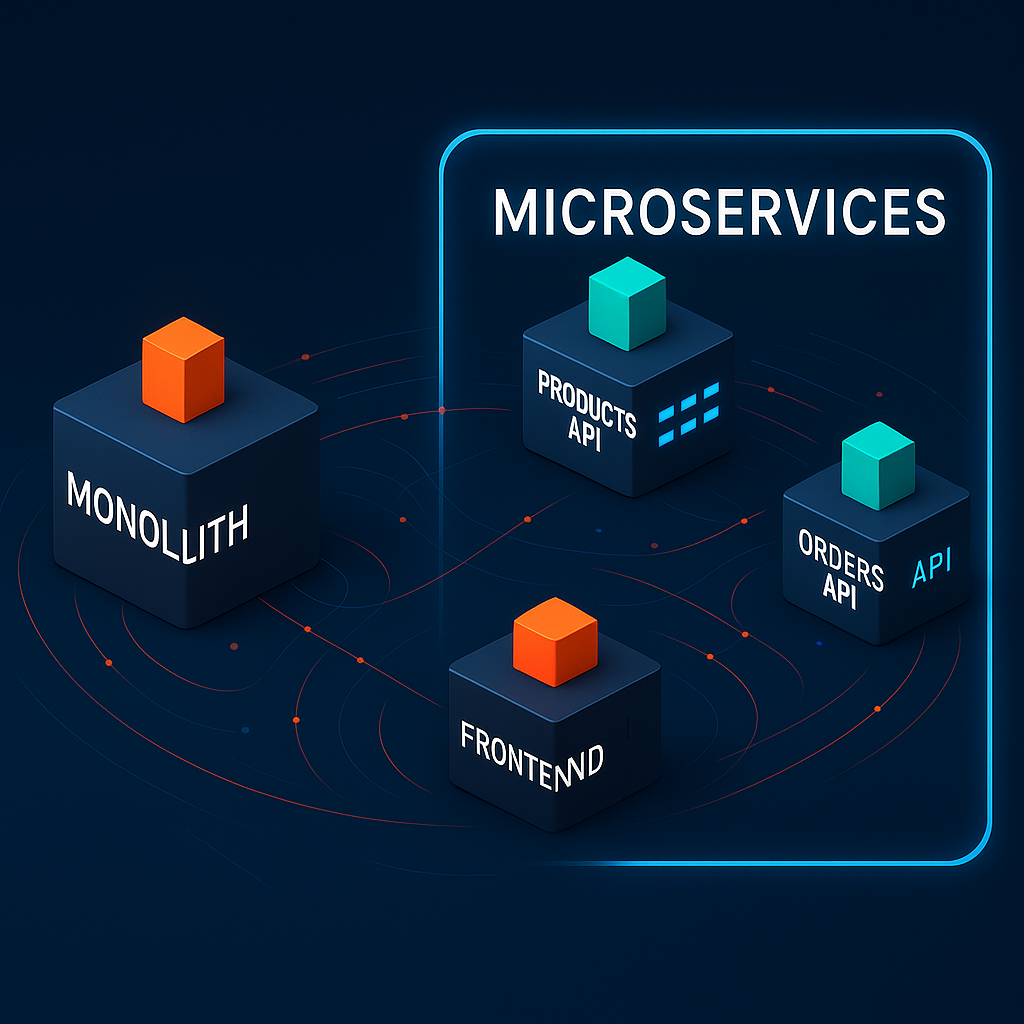
Most web applications start with a single codebase — the Monolithic architecture. While simple and fast to implement initially, it becomes increasingly difficult to maintain as your application grows in scale.
This is where Microservices and Google Kubernetes Engine (GKE) come into play. In this article, I’ll explain these concepts from a beginner’s perspective and demonstrate the migration process to GKE with a simple example.
🏷 Monolith
A monolithic architecture is where all functionalities (frontend, backend, database, etc.) reside on a single server within a single codebase. Think of it as an application built on a single framework.
- Backend: Single frameworks like Spring Boot (Java), Django/Flask (Python), Express/Nest.js (Node.js), Rails (Ruby)
- Frontend: Either included in the same project or deployed separately but still as a single application
Monolith Architecture
├── src/
│   ├── controllers/ (or routes/)
│   ├── models/
│   ├── services/
│   ├── views/ (or templates/)
│   ├── utils/
│   └── app.js (or main file)
├── public/ (or static/)
│   ├── css/
│   ├── js/
│   └── images/
└── package.json (or dependency management file for the language)
While simple at first, management becomes challenging as features multiply.
🏷 Microservices
Microservices architecture divides functionality into smaller service units. Each can be developed, deployed, and scaled independently:
- Frontend Service — Handles user interface
- Order Service — Processes orders
- Product Service — Manages product data
Microservices Architecture
__ Frontend Service
      |__ Handles user interface
      |__ Communicates with API Gateway or BFF
__ Orders Service
|__ Creates, retrieves, cancels orders
|__ Manages order status
|__ Processes via message queue or event-based handling__ Products Service
|__ Provides product listings and details
|__ Registers/modifies/deletes products
|__ Manages inventoryWith microservices, problems in one service don’t bring down the entire application.
You might notice similarities with APIs — and you’re right. Microservices typically communicate with each other using APIs. Think of microservices as the higher-level concept (architectural philosophy) with APIs as a component beneath (though microservices don’t always require APIs).
🏷 Google Kubernetes Engine (GKE)
GKE is Google Cloud’s managed Kubernetes service. It helps orchestrate containerized applications, handling the complexities of deployment, scaling, and management. As we explore this further, you’ll develop a better understanding of how it works.
🏷 Why Migrate?
This brings us to the fundamental question: why move from a well-functioning monolith to microservices?
✅ Problems with Monoliths:
- Inefficient scaling (entire application must scale even when only specific features experience high traffic, wasting resources)
- Long deployment cycles and downtime (even small changes require redeploying the entire system)
- Single point of failure (errors in one area can bring down the entire system)
- Increasing complexity becomes difficult to understand (as the codebase grows, developers struggle to comprehend all parts)
- Technology stack is fixed for the entire application (introducing new technologies affects the whole system)
✅ Benefits of Microservices:
- Services can scale independently based on demand (popular payment service can be scaled with additional servers)
- Updates deploy without impacting the entire system (user service updates don’t affect other functionality)
- Better fault isolation (product service downtime doesn’t affect cart and payment operations)
- Teams work independently with clear boundaries (product and payment teams can develop without interference)
- Freedom to use different technologies for different services (Python for data processing, Node.js for real-time features)
These contrasts make the case for microservices migration quite clear.
🏷 Implementation Process
✅ Identifying Service Boundaries
Analyze your monolith and identify logical components that could become independent services. Look for sections that:
- Provide specific business functionality
- Have minimal dependencies on other components
- Can be modified independently
✅ Containerizing Each Service
# Build Docker image for Frontend UI
docker build -t frontend-service:1.0 ./frontend

# Build Docker image for Products Service
docker build -t products-service:1.0 ./products

# Build Docker image for Orders Service
docker build -t orders-service
✅ Deploying to GKE
First, create a GKE cluster:
gcloud container clusters create shop-cluster --num-nodes=3Then build each service:
Products Service
# Build + push Docker image
cd ~/monolith-to-microservices/microservices/src/products
gcloud builds submit --tag gcr.io/${GOOGLE_CLOUD_PROJECT}/products:1.0.0 .

# Deploy to GKE
kubectl create deployment products --image=gcr.io/${GOOGLE_CLOUD_PROJECT}/products:1.0.0

# Expose externally (allow external access)
kubectl expose deployment products --type=LoadBalancer --port=80 --target-port=8082
# Deploy to GKE
kubectl create deployment products --image=gcr.io/${GOOGLE_CLOUD_PROJECT}/products:1.0.0# Expose externally (allow external access)
kubectl expose deployment products --type=LoadBalancer --port=80 --target-port=8082Orders Service
# Build + push Docker image
cd ~/monolith-to-microservices/microservices/src/orders
gcloud builds submit --tag gcr.io/${GOOGLE_CLOUD_PROJECT}/orders:1.0.0 .

# Deploy to GKE
kubectl create deployment orders --image=gcr.io/${GOOGLE_CLOUD_PROJECT}/orders:1.0.0

# Expose externally (allow external access)
kubectl expose deployment orders --type=LoadBalancer --port=80 --target-port=8081
Frontend Service
# Build + push Docker image
cd ~/monolith-to-microservices/microservices/src/frontend
gcloud builds submit --tag gcr.io/${GOOGLE_CLOUD_PROJECT}/frontend:1.0.0 .

# Deploy to GKE
kubectl create deployment frontend --image=gcr.io/${GOOGLE_CLOUD_PROJECT}/frontend:1.0.0

# Expose externally (allow external access)
kubectl expose deployment frontend --type=LoadBalancer --port=80 --target-port=8080
✅ Summary

All services are exposed externally through LoadBalancers and connected to the frontend.
🔥 Conclusion
This has been a taste of migrating from monolith to microservices using simple commands. As you can see, it’s not a trivial task, requiring thorough planning and preparation.
I recommend starting by separating less critical services, implementing monitoring, and then automating testing and deployment. This approach is called the Strangler Pattern (a migration strategy that gradually replaces legacy systems with new ones).
In a future post, we’ll explore this process in more detail using Google Cloud.
Until then, happy hacking! 😊
This essay was originally published on Medium and migrated to KanApp Blog.

Comments
Join the conversation
Sign in to leave a comment.
Comment login is being configured.
No comments yet.