

MCP Part 1: Beyond AI Limitations — Your Essential Guide to MCP
Felt the limitations of AI? Here’s the answer you’ve been looking for
🏷 Introduction to Model Context Protocol (MCP)
Today, I’d like to explore a groundbreaking development in the AI landscape: the Model Context Protocol (MCP).
This innovative approach is rapidly gaining attention among AI developers and enthusiasts alike.
🏷 What is Model Context Protocol (MCP)?
Model Context Protocol (MCP) represents a sophisticated methodology designed to significantly enhance Large Language Model (LLM) performance.
At its core, MCP is a protocol that enables AI models to process and understand contextual information with unprecedented effectiveness.
Learn more:
What is the Model Context Protocol (MCP)? | Explained In Plain English
The Model Context Protocol (MCP) is an open standard that lets AI models interact with tools, data, and prompts…plainenglish.io
🏷 Core Concepts of MCP:
- Model: The foundational AI language model (GPT, BERT, Claude, etc.) that processes information.
- Context: The comprehensive input information processed by the model, encompassing conversation history, reference materials, instructions, and relevant contextual data.
- Protocol: The systematic framework defining how models interpret and process contextual information to generate responses.
🏷 Advantages of MCP
Implementing MCP offers several distinct benefits:
- Enhanced Contextual Understanding: Models can comprehend and maintain more complex and broader contexts.
- Improved Consistency: Delivers coherent, consistent responses even during extended interactions or with complex queries.
- Greater Accuracy: Generates more precise and relevant responses by leveraging comprehensive contextual information.
- Customized Interactions: Provides tailored responses that better align with specific user requirements and situations.
By leveraging MCP, developers can dramatically improve how AI systems interact with complex information structures, ultimately creating more sophisticated and valuable AI applications.
🏷 MCP Architecture
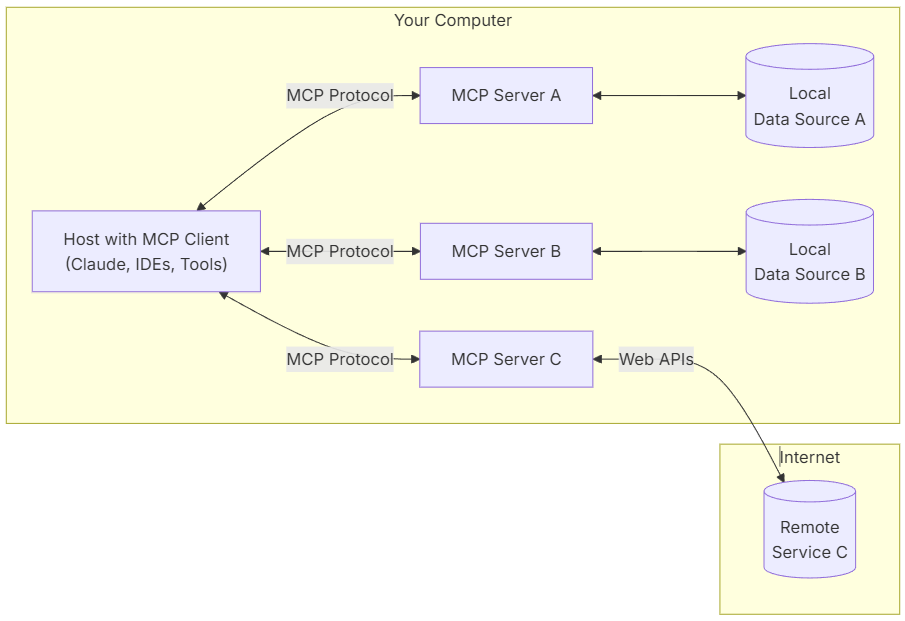
The MCP framework employs an elegant client-server architecture that allows a single host application to interface with multiple servers simultaneously. In this configuration, the host with MCP client capabilities (which may include Claude, various IDEs, and specialized tools) communicates with several MCP servers (Servers A, B, C, etc.) through the standardized MCP Protocol.
Each server can access different data sources — some connecting to local repositories while others may interface with remote services via Web APIs across the internet. This versatile architecture provides exceptional flexibility and scalability, enabling host applications to leverage diverse context sources through a unified protocol.
🏷 MCP in Simple Terms
To conceptualize MCP more intuitively, think of it as a sophisticated set of rules that revolutionizes how AI models process information.
Consider this practical example: When asked “How’s the weather today?”:
- Regular AI: Might simply provide current weather data or acknowledge its inability to access real-time information.
- MCP-enabled AI: “It’s sunny in London today with a temperature of 22°C. By the way, rain is forecasted for tomorrow, so I’d recommend bringing an umbrella.”
(Note: This example is simplified for explanatory purposes; actual implementations may vary significantly.)
💡 You can also send email using MCP by wrapping email logic into a custom tool server — making actions like follow-ups or reminders part of your AI’s contextual capabilities.
🏷 Advanced Benefits of MCP
MCP can deliver substantially more valuable information even for seemingly simple queries by intelligently utilizing contextual elements such as user location, schedule, conversation history, and other relevant factors.
A critical distinction between traditional cloud-based AI and MCP approaches lies in where data processing occurs and how user privacy is safeguarded. While conventional cloud AI typically transmits all data to remote servers for processing, MCP can perform significant processing locally, dramatically enhancing privacy protection.
This framework enables individuals to customize their AI experience effortlessly or integrate servers (programs) that address their specific requirements. This democratization of AI customization explains why MCP has generated such significant interest within the technology community.
For comprehensive technical details, please refer to the official documentation: https://modelcontextprotocol.io/introduction
🏷 MCP vs GPTs
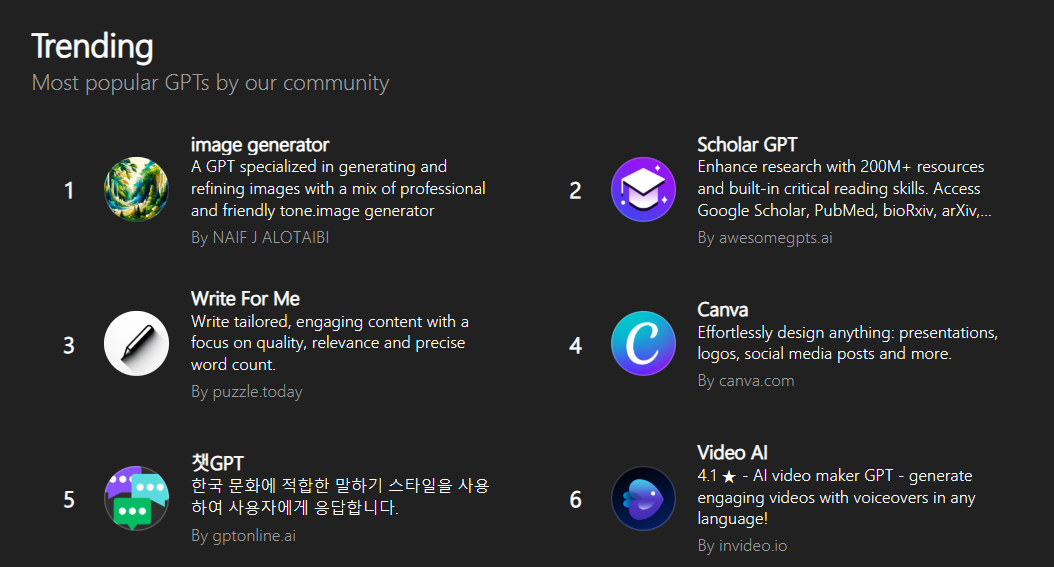
The AI community recently experienced considerable excitement around GPTs and their Knowledge feature, which aimed to expand model knowledge through file uploads. However, this approach had notable limitations.
Since uploaded documents weren’t subjected to comprehensive pre-training but were instead vector-embedded and utilized on a search basis, they lacked deep semantic integration. Additionally, these documents were only referenced within a constrained context, making it challenging to grasp the nuanced relationships within complex documents.
In practice, results often fell short of expectations, frequently producing inconsistent responses. While certain specialized implementations achieved satisfactory results, for most applications, the distinction between using GPTs or standard cloud-based AI remained negligible.
MCP, by contrast, offers significantly more sophisticated customization capabilities. The subsequent articles in this series will provide deeper insights into these substantial advantages.
🏷 Prerequisites for Using MCP
To implement MCP, you’ll first need Node.js installed on your system (Docker can serve as an alternative). You can obtain Node.js from https://nodejs.org/en/download, which includes comprehensive configuration instructions and documentation.
# Download and install nvm:
curl -o- https://raw.githubusercontent.com/nvm-sh/nvm/v0.40.2/install.sh | bash

# in lieu of restarting the shell (macOS)
\. "$HOME/.nvm/nvm.sh"

# Download and install Node.js:
nvm install 22

# Verify the Node.js version:
node -v # Should print "v22.14.0".
nvm current # Should print "v22.14.0".

# Verify npm version:
npm -v # Should print "10.9.2".
Node.js enables JavaScript — originally designed for web browsers — to execute on servers or local machines. For our implementation, you’ll need access to the npx command, which comes bundled with Node.js installations.
Once Node.js is properly configured, both node and npx commands will be available from your command prompt or PowerShell interface.
The next step involves selecting an appropriate MCP client for your needs.
🏷 Selecting an MCP Client
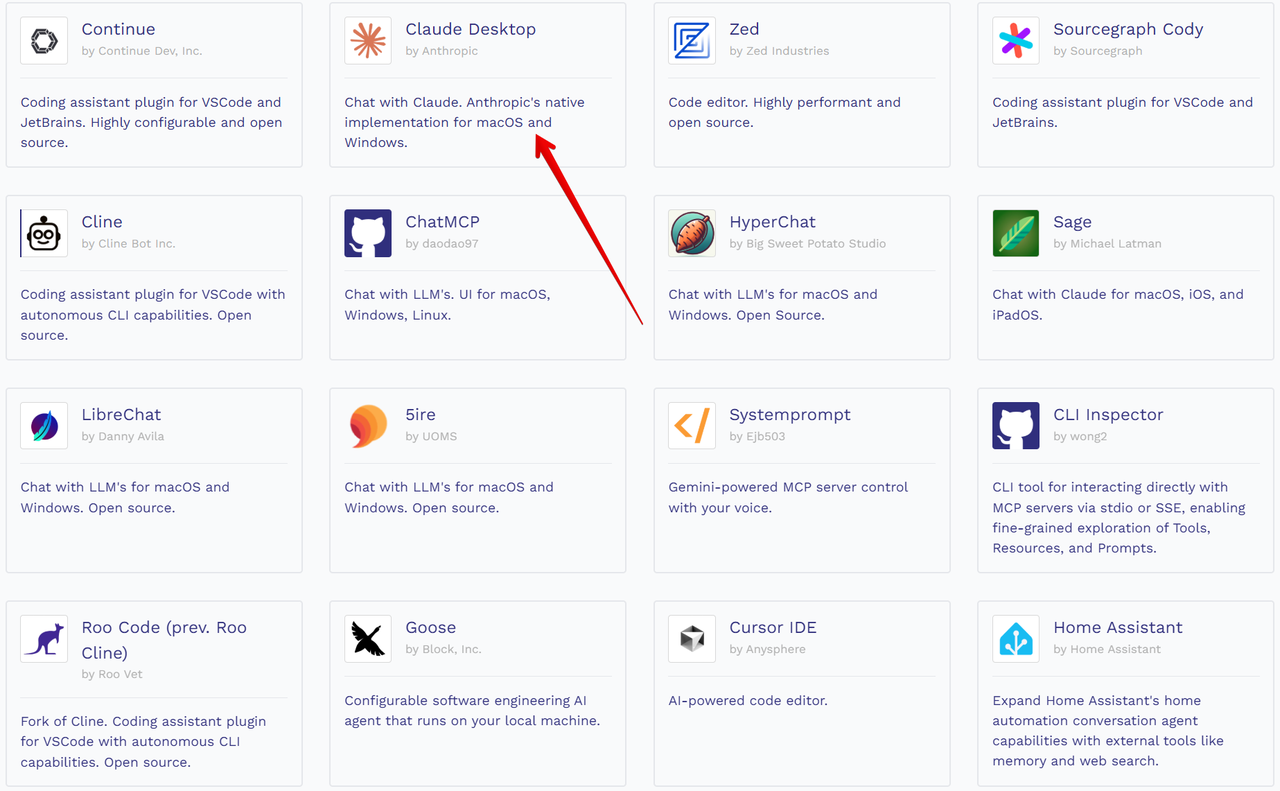
Various client tools are available, though most function as code assistants or editor/IDE enhancements.
For this tutorial series, we’ll utilize Claude desktop, a renowned AI assistant. (Note: I’m uncertain whether the free version has any feature limitations that might affect MCP functionality.)
You can download Claude desktop from https://claude.ai/download.
Please be aware that the software is currently in beta status, so you might encounter occasional bugs or stability issues.
🏷 Conclusion
Once you’ve successfully installed both Node.js and Claude desktop, you’re fully equipped to begin working with MCP.
In the next installment of this series, we’ll explore advanced MCP implementations and practical applications…
This essay was originally published on Medium and migrated to KanApp Blog.
Comments
Join the conversation
Sign in to leave a comment.
Comment login is being configured.
No comments yet.