

Cursor vs. Kiro: Key Differences from a Senior Developer’s Perspective
Why I’m rethinking ‘Vibe Coding’ after 22 years of development
Prologue: Is “Vibe Coding” Really Sustainable?
I currently use Cursor as my main IDE. Its Ctrl+K and Composer features have been nothing short of revolutionary. The so-called "Vibe Coding" experience—where you speak your mind and the AI instantly spits out code—has dramatically increased my development speed.
However, as a full-stack developer with 22 years of experience, I’ve always felt a lingering unease.
“It’s fast, sure… but as the project grows, the code is bound to get tangled. I’d better backup everything first…”
When you code enthusiastically with Cursor, there often comes a moment where the architecture crumbles, leaving behind a massive plate of ‘spaghetti code.’ Yet, going back to developing without an AI assistant feels too inconvenient and frustrating. I’ve been constantly grappling with this dilemma.
Then I discovered Kiro IDE by AWS. I decided to put it to the test by participating in the Kiroween Hackathon with a project called ‘DevOps Nightmare’.
Spoiler Alert: Kiro isn’t just a coding tool; it’s an “AI Architect.” Today, I want to talk about that crucial difference.
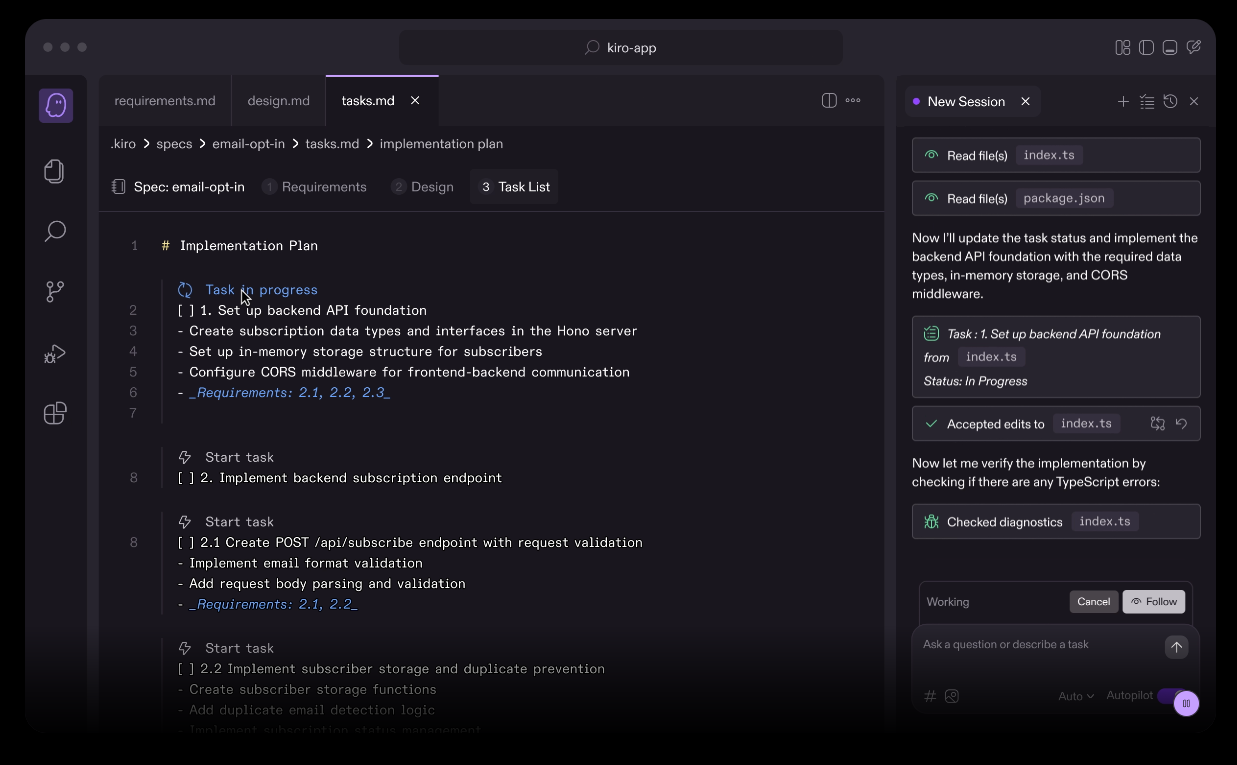
1. Cursor vs. Kiro: A Fundamental Difference in Approach
The biggest difference lies in what happens immediately after you hit Enter.
⚡ Cursor (Bottom-Up): “Let’s code first.”
If I tell Cursor, “Create a dashboard where the background changes based on AWS status,” it immediately touches App.tsx and pours out code.
It’s fast. But what about global state management? Error handling? Those are dealt with later, only when errors actually occur. It’s a speed-centric “Patchwork” approach.
While using MCP or expensive models can mitigate this to some extent, we all know that as the codebase grows, you inevitably end up wasting time on refactoring.
🏗️ Kiro (Top-Down): “Let’s plan first.”
If I say the same thing to Kiro, it doesn’t write code immediately. Instead, it creates documents in the .kiro folder.
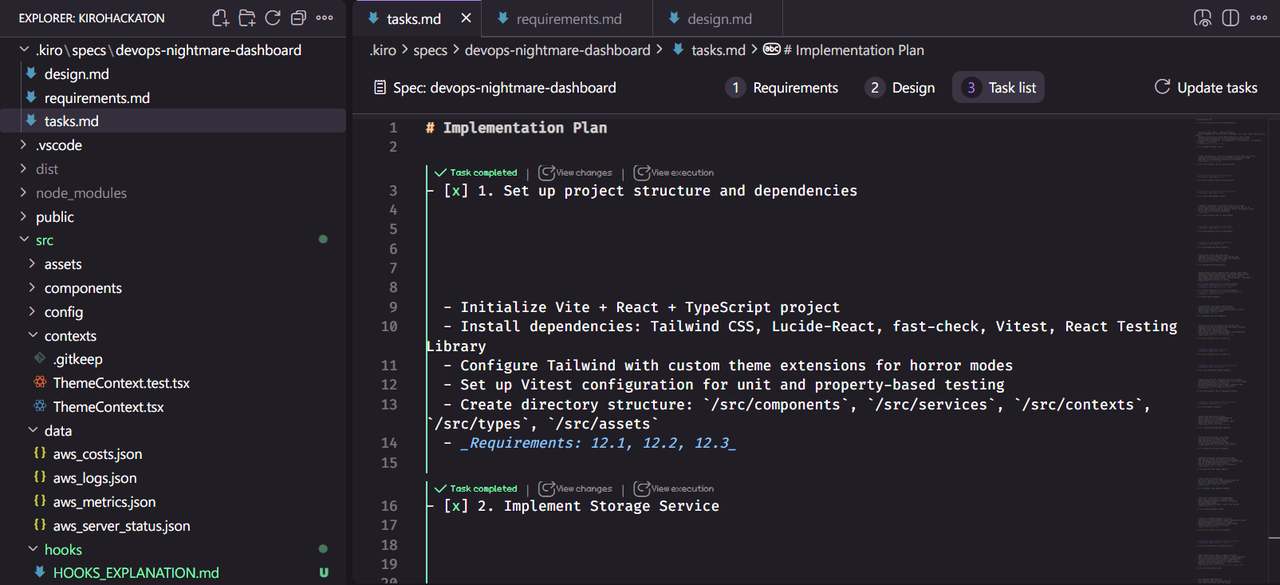
requirements.md: It asks back, "If the AWS API key is missing, should we fallback to Hacker News RSS?"design.md: It proposes, "I will decouple the UI components from the data fetching logic (Hooks)."tasks.md: It sets the implementation order and waits for my approval.
This is “Spec-Driven Development.” It was an experience where the AI forced me to fill the “absence of design,” which was the biggest limitation of Vibe Coding. (Of course, Kiro also offers a Vibe mode, so you can choose your preferred style.)
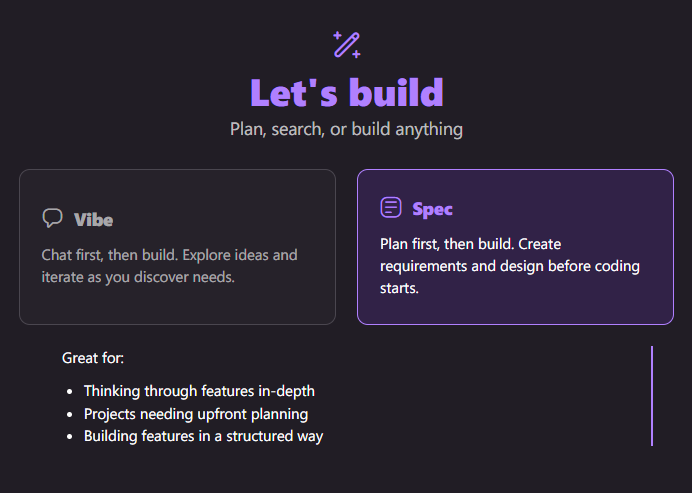
To elaborate a bit more: Spec Mode essentially acts as a “Planner,” generating code strictly within that defined architecture. At first glance, this might look similar to other tools. However, the critical difference lies in adherence. Kiro never strayed from the defined scope of the specs and faithfully executed the requirements. This, I believe, is the game-changer.
With other tools, things usually start off smooth, but you eventually hit a “breaking point” where the AI loses context and the code collapses. Even when using top-tier “Max” plans, they inevitably crumble under the weight of massive token contexts (at least, that’s been my experience).
Kiro, however, builds code while strictly adhering to the Spec. So, when it reaches that usual breaking point, it feels like the architecture is holding everything together, preventing that collapse.
Although this wasn’t a massive enterprise project, it was definitely the most comfortable development experience I’ve had, with almost no major hallucinations or errors. Sure, you could probably achieve a similar result using Cursor + Max + MCP, but the key difference is the ease of execution.
In short, it’s not that Kiro is some magical tool that does the impossible. It’s simply that, unlike its predecessors, it stops the code from turning into a mess. It might sound trivial, but I see this as a significant leap forward.
It feels like we are finally learning how to properly tame a wild, powerful horse.
2. Hackathon Project ‘DevOps Nightmare’: The Moment Kiro Became the Architect
My Hackathon project was a dashboard that turns into a “bloody horror theme” when server health degrades. It looks simple on the surface, but the internal logic was complex.
- Normal State: Peaceful landscape via Unsplash API + Hacker News RSS.
- Critical State: Glitch effects + AWS CloudWatch data integration + Red theme transition.
🛑 The Problem I Would Have Faced with Cursor
I probably would have spammed if (isHorror) statements in every component without a proper ThemeContext. Later, if I asked to "Add a Pomodoro timer," the existing logic would likely tangle, causing the clock to stop or the background to vanish.
✅ Kiro’s Solution (The Power of Specs)
When I prompted, “Completely separate the Peaceful Mode and Horror Mode,” Kiro first generated a State Machine design in design.md.
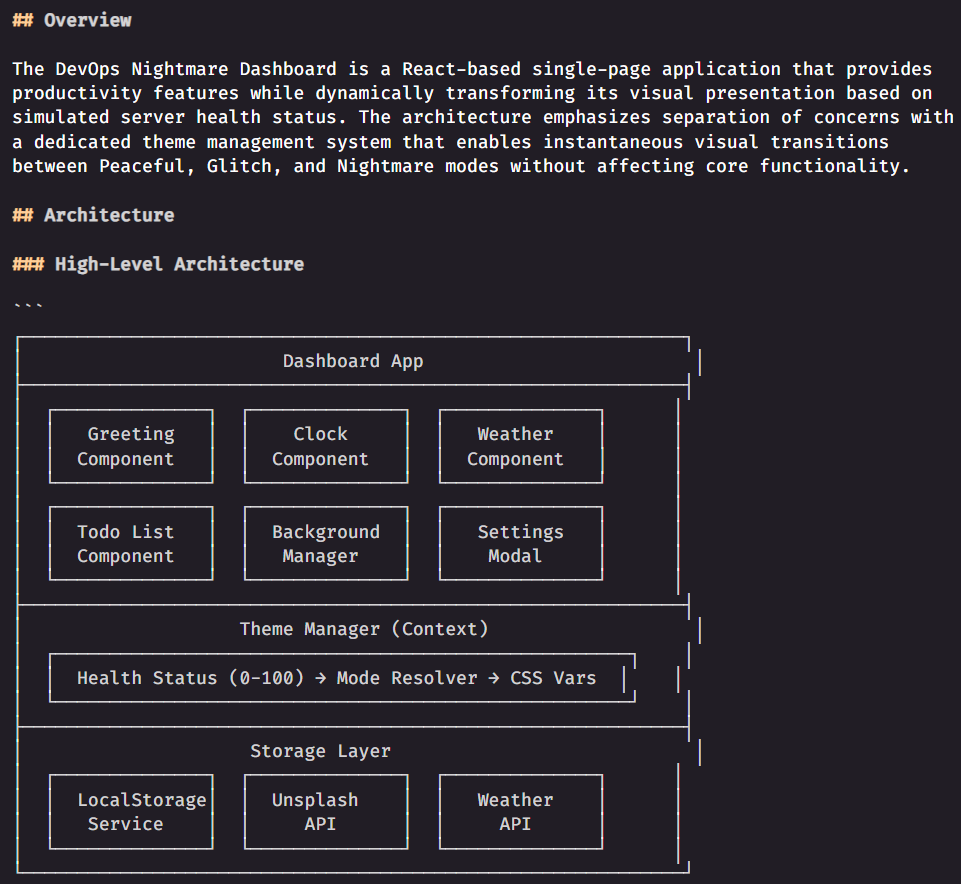
The most surprising part was extensibility. At the end of the project, when I asked to add a “Pomodoro” feature, Kiro didn’t touch the existing AWS monitoring code. Instead, it carved out a separate usePomodoro hook and attached it cleanly. This was possible because the "structure" was already in place.
3. Agent Hooks: The “Safety Net” Built by AI
Another strength of Kiro is “Agent Hooks.” In Cursor, if the AI writes API integration code, error handling is entirely up to the developer.
But Kiro performed Defensive Coding without me even asking.
Case Study: Defensive Design of usePolling for Uninterrupted Service
Kiro didn’t just write code to call an API; it designed a generic hook (usePolling) under the premise that "any API can fail."
Internally, it used try-catch to reliably capture errors and, instead of crashing the app, handled them gracefully via an onError callback. It also automatically generated shared hooks whenever necessary.
catch (err) {
  const error = err instanceof Error ? err : new Error('Unknown error occurred');

  if (isMountedRef.current) {
    setError(error);
    setLoading(false);

    if (onError) {
      onError(error);  // Custom error handler
    } else {
      console.error('Polling error:', error);  // Default error logging
    }
  }
}
Thanks to this, the app didn’t crash even when there was an API issue during the demo video recording. It felt like the AI had perfectly executed the task, “Handle exceptions thoroughly,” just as a senior developer would instruct a junior.
4. A Shocking Experience: Self-Healing AI
The moment I got goosebumps using Kiro wasn’t during feature implementation, but during the “Testing” phase.
With standard AI coding tools (like Cursor), the AI writes the code, but if a test fails, the developer has to read the error log and re-prompt or fix it manually. In other words, “Cleaning up the mess is human work.”
But Kiro was different.
📸 Situation: Error during npm test
While running tests for StorageService, a critical error popped up: Invalid todo item format. Normally, I would have had to copy the terminal log and ask, "Why is this failing? Fix it."
🤖 Kiro’s Action: “I’ll fix it.”
However, Kiro reacted before I could even type.
- Error Detection: It read the terminal error log (
Invalid todo item format) on its own. - Root Cause Analysis: It diagnosed exactly: “Ah, the test failed because the
completedfield is missing in the generated todo item." - Autonomous Repair: It said, “I need to update the StorageService test…” and immediately started fixing the test code.
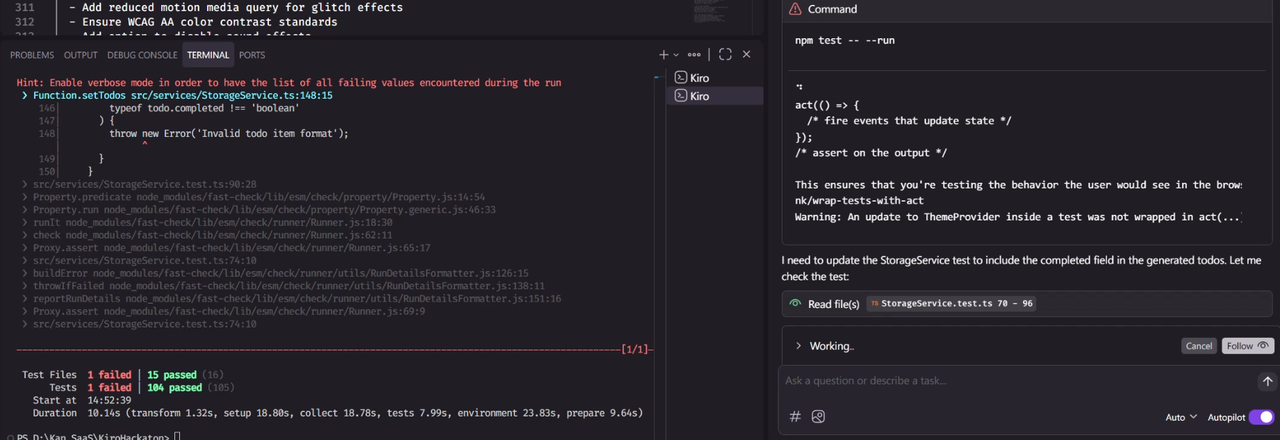
This isn’t just autocomplete. It is “Self-Healing” code. It felt like a seasoned colleague saying, “Oops, I missed a field in the test code. I’ll fix it and commit right now.”
Through this experience, I became convinced that Kiro is not just a “typing assistant,” but an “Agent that understands and takes responsibility for my project.”
5. Beyond the Limits of Vibe Coding
Of course, Kiro is not a silver bullet. The initial setup process is longer than Cursor’s, and it can be frustrating when it tries to update Specs even for minor changes.
But from the perspective of a 22-year veteran developer, Kiro’s approach is the correct one for building “Sustainable Software.”
- Cursor: Jazz Jam Session. Fast and exciting, but hard to replicate exactly.
- Kiro: Orchestral Score Composition. Preparation takes time, but the performance is grand and precise regardless of who plays it.
Simply put, Cursor feels like an unconstrained AI coding editor, while Kiro performs AI coding within a designed structure.
Pain Points & Trade-offs
Accustomed to the fast and intuitive experience of Cursor, I did feel some clear friction with Kiro.
In Spec Mode, even simple modifications become a “Project.” (High Overhead). In Cursor, I can say “Change this button to red,” and it’s done in a second. But in Kiro’s Spec Mode, even this trivial change is treated as a ‘Task’ to be processed. (This is just an example, but you get the idea.)
I suspect this is why Kiro offers a separate Vibe Mode, allowing it to be used more like Cursor.
My Verdict on Workflow:
- Use Vibe Mode for: Rapid prototyping, simple fixes (CSS, typos), and small solo projects.
- Use Spec Mode for: Complex feature development (Auth, Payments, Dashboards), team collaboration (where docs are needed), long-term maintenance projects, and situations requiring code reviews.
Finally, regarding documentation: The documents on my GitHub were automatically updated by Kiro to match the code. I’ve tried attaching MCP to Cursor, but this is the first time with Kiro that I’ve seen documentation handled so perfectly. I can only imagine how powerful Kiro will become if combined with MCP features. (Currently, Kiro only supports Claude models.)
🚀 Conclusion: A New Challenger to Cursor
Through this Hackathon, I shifted from “writing” code to explaining my “Intent” to the AI and verifying the “Spec/Design.”
If Cursor is a “Super Coding Assistant,” Kiro is a “Reliable Partner Architect.” If you are building a product that requires maintenance beyond a simple toy project, Kiro’s Spec-Driven approach will be a powerful weapon.
Final Thoughts: A Sleeping Giant?
Based on my short experience, I genuinely believe Kiro has the potential to become a powerful IDE capable of fully replacing Cursor. With the robust backing of Amazon, once it undergoes a bit more polish over time, it is going to be truly formidable. Surprisingly, however, it seems to be receiving far less attention and hype in the community than it deserves.
To be honest, I initially approached it with skepticism — thinking, “Isn’t this just another Cursor clone?” But I was proven wrong. The most liberating part was that Kiro handles the architectural design so well that I didn’t have to constantly issue additional commands or micro-manage the context.
The “Peace of Mind” Factor The biggest convenience was its autonomy in testing and documentation. I didn’t have to constantly double-check if the docs matched the code or if the tests were running.
(In my experience with Cursor or Claude Code, details often fall through the cracks. They work well for a while, but once they start missing updates, they silently drift out of sync. I often wouldn’t realize something was omitted until much later, forcing me to constantly audit the AI’s work. Kiro eliminates that anxiety.)
Kiro manages this consistency automatically, allowing me to trust the tool rather than babysit it.
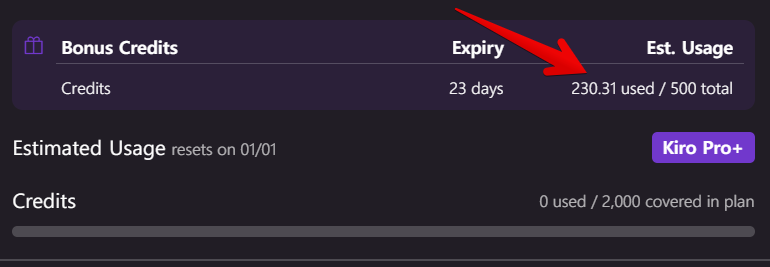
Currently, I am subscribed to the KIRO PRO+ plan. However, new users get 500 free credits upon signing up. To give you some context on usage: I ran Kiro relentlessly for a full week without worrying about the cost, and I only ended up using about 230 credits.
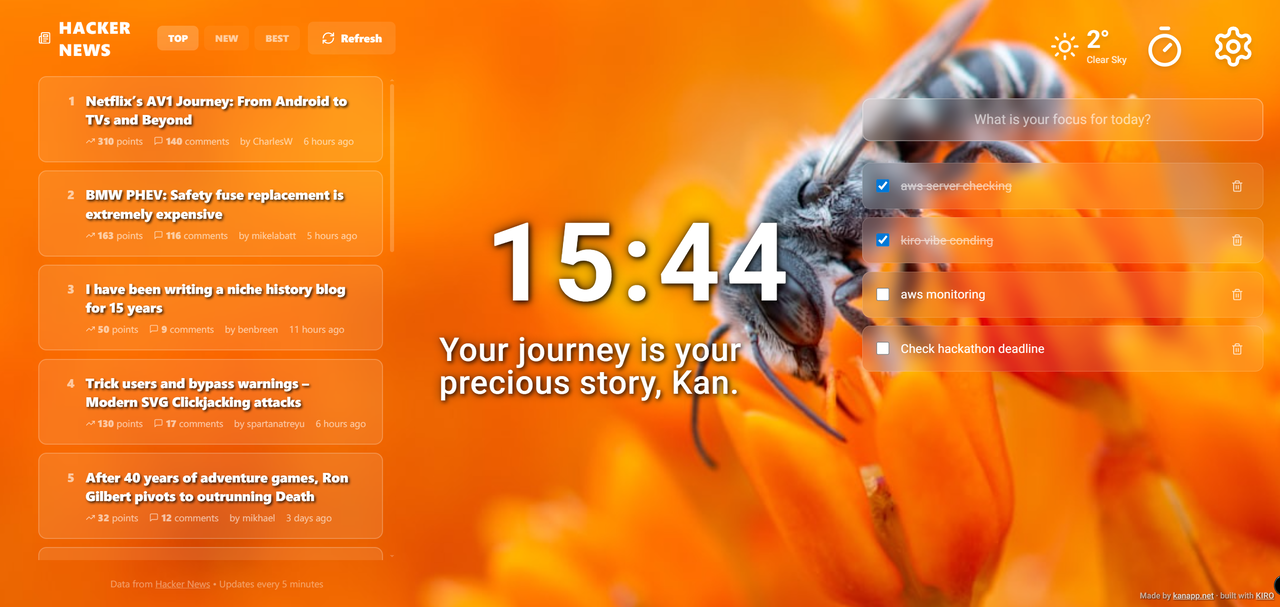
The result of that intense week is this “Momentum-style” Dashboard. Out of the box, it provides Hacker News RSS + Pomodoro + Todo List. If you connect your AWS API, it transforms into an AWS Monitoring + Pomodoro + Todo List tool. (Note: It is currently set up to run on mock data for the demo, so you might need to tweak the AWS connection part slightly for real-world use.)
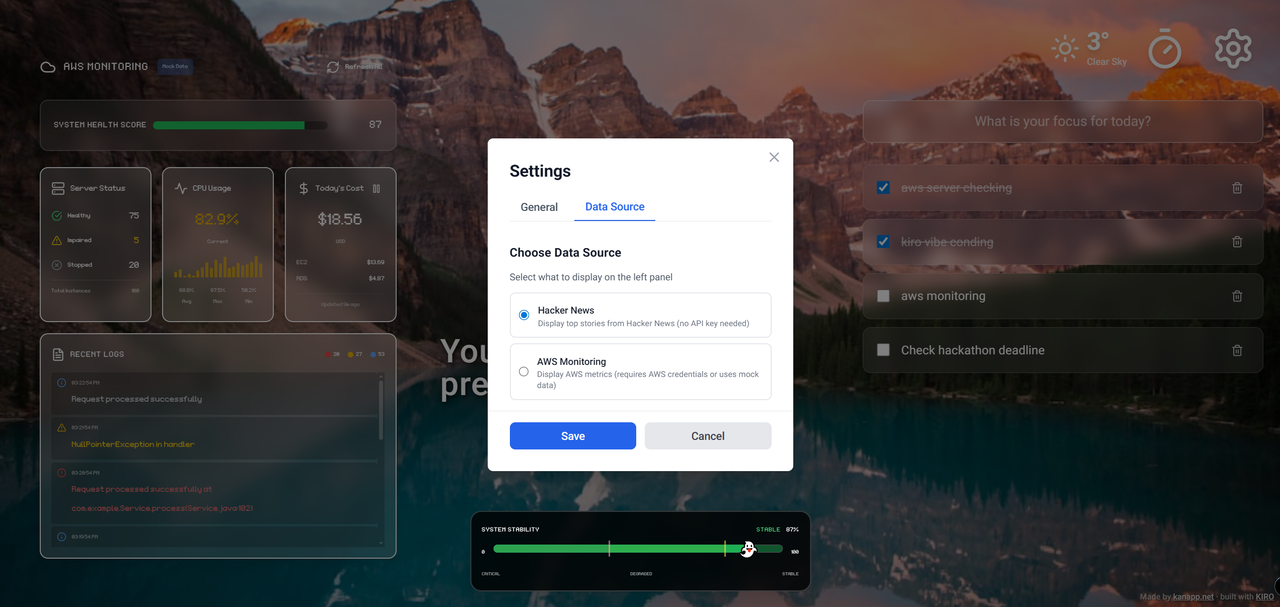
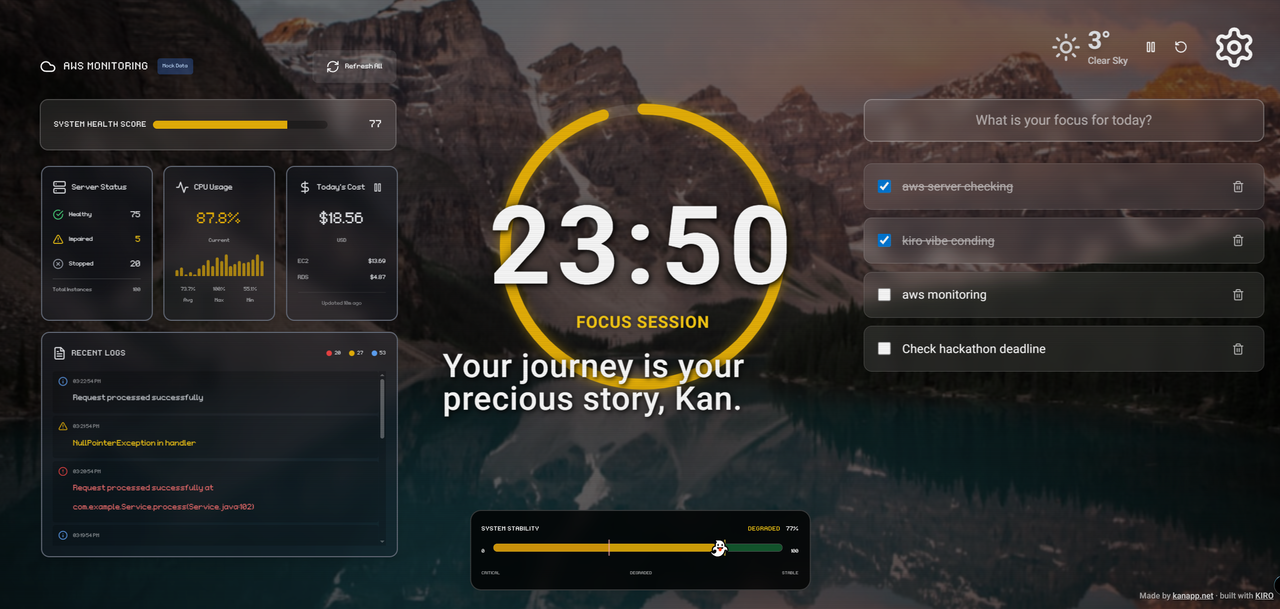
I have uploaded the full source code to my GitHub repository below. Feel free to explore the code structure and the .md specs generated by Kiro.
If you found this post helpful or interesting, I would really appreciate a Star on the repo! ⭐️
This essay was originally published on Medium and migrated to KanApp Blog.

Comments
Join the conversation
Sign in to leave a comment.
Comment login is being configured.
No comments yet.