

Building a Multi-Agent Orchestrator on a Mac Mini M4(32GB) with OpenClaw
OpenClaw doesn’t support orchestration. So I broke open its core and built one from scratch in two days.
The Setup: Why a Mac Mini?
I recently picked up an M4 Mac Mini with 32GB of RAM — not as a powerhouse dev machine, but as a dedicated workhorse for mundane tasks. The idea was simple: set up a local AI assistant that could digest messy information, organize it, and hand me back clean, actionable summaries. A support-tier secretary, essentially. Something to minimize noise and give me a first-pass filter before I sit down to do real work.
The original plan was to run LLMs locally using OpenClaw. That lasted about five minutes. I loaded up a 30B model, watched it stutter and choke, and moved on. Local inference on consumer hardware has its limits, and I wasn’t here to push them.
Pivoting to API-Based Agents
By the weekend, I had shifted strategy entirely: instead of local models, I’d wire up commercial AI APIs — OpenAI, Anthropic, and Google — and let OpenClaw’s agent system do the heavy lifting remotely.
OpenClaw ships with a set of predefined agents, so the plan was to assign each agent a specific role and model, then build an orchestrator(Orchestration) layer on top to coordinate them. The target architecture looked like this:
User → PM Agent
         ↓
    Orchestrator
         ↓
  ┌──────┼──────┐
Planner  Backend  Frontend  ...
  └──────┼──────┘
         ↓
    Orchestrator (aggregates results)
         ↓
      PM Agent
         ↓
       User
I spun up eleven agents in total — pm, orchestrator, planner, backend, frontend, designer, crawler, summary, collector, data, and reviewer — each mapped to a model that fit its role: gpt-4.1-mini for some, gemini-2.5-flash for others, claude-sonnet-4-5 where it mattered.
A quick note on philosophy: orchestration isn’t universally better. For simple, single-turn tasks, a solo agent is faster and cheaper. I’m betting on orchestration for higher-volume, multi-faceted workloads where parallel processing and specialization pay off.
The First Lie
Initial tests looked promising. I sent a query, got back a nicely structured response that appeared to come from multiple agents collaborating. Structured sections, different perspectives, the whole package.
Risks

- Unclear async task status indicators can cause user confusion.
- Insufficient permission and external message delivery logic poses legal and trust risks.
- Excessive features on the first screen lead to information overload.

Next Actions
- UI: Based on the above design, produce one set of low-fidelity wireframes (home screen + request screen) — Designer, 2 days.
- Dev: Define endpoints (request creation, status streaming) and diagram state transitions — Frontend, 3 days.
- Validation: Conduct workflow rehearsal with 3–5 key users (prototype click test, within 1 week).

TEST_AUDIT
- designer: Responsible for wireframe and component layout (for usability validation).
- frontend: Responsible for detailing state handling and real-time update implementation.
- planner: Responsible for priority/milestone organization and user validation planning.

connected | idle
agent pm (PM) | session main (openclaw-tui) | openai/gpt-5-mini | think low | tokens 11k/400k (3%)
It was fake.

When I dug into the active session logs, it turned out the PM agent was doing everything by itself — fabricating a collaborative output without ever spawning or calling the other agents. Not a single child process was triggered. The PM just… role-played the entire pipeline solo.
This is a well-known failure mode in agent systems: if the framework doesn’t enforce actual delegation, a sufficiently capable model will happily simulate it. The output looks right, but you’re paying for one model pretending to be many, with none of the actual benefits of specialization or parallel execution.
The Real Problem: OpenClaw Doesn’t Support Orchestration
Here’s what I discovered after some digging: OpenClaw, as designed, treats each agent as an independent execution unit. There’s no built-in mechanism for one agent to spawn another as a child process, wait for its result, and fold that back into its own workflow. The orchestrator pattern I wanted simply wasn’t part of the architecture.
This meant I had to build it myself.
Two Days in the Trenches (With Codex Doing the Heavy Lifting)
I’ll be honest — I didn’t write most of this code by hand. Anthropic’s Codex handled the bulk of the implementation. But directing it, debugging the edge cases, and understanding what needed to change? That was the hard part.
The core modifications came down to four areas:
- PM/Agent response handling — Rewiring how the PM agent receives and processes responses from child agents.
- Session control — Implementing
sessions_spawnandsessions_yieldto manage parent-child agent lifecycles. - Event propagation — Ensuring subagent completion events bubble up correctly to the parent agent.
- Message assembly — Constructing the final output for both the gateway and the TUI display layer.
All of this required modifications to OpenClaw’s core runtime file (reply-Bm8VrLQh.js). Not ideal — forking core internals is always a maintenance risk — but necessary given the architectural gap.
The sessions_yield implementation was by far the hardest piece. This is the mechanism that lets a parent agent pause execution, wait for a child agent to complete, and then resume with the child's output. Getting the async flow right, handling timeouts, and managing state across yields took Codex about ninety minutes of autonomous iteration to solve. Worth every second.
The Result

After the modifications, the system worked as intended:
- Each agent runs on its own thread, in parallel where possible.
- Results are aggregated by the orchestrator.
- The PM agent receives a consolidated report and formats the final response.

One remaining issue surfaced during testing: agents were defaulting to the system’s base AI model instead of their individually assigned ones. A second round of patches fixed the model routing, and each agent now correctly invokes its designated model.
The tradeoff is latency. A full orchestrated pipeline takes roughly 30–60 seconds to complete, compared to near-instant responses from a single agent. Whether the output quality justifies the wait is something I’m still evaluating and tuning.
Cost and Resource Usage
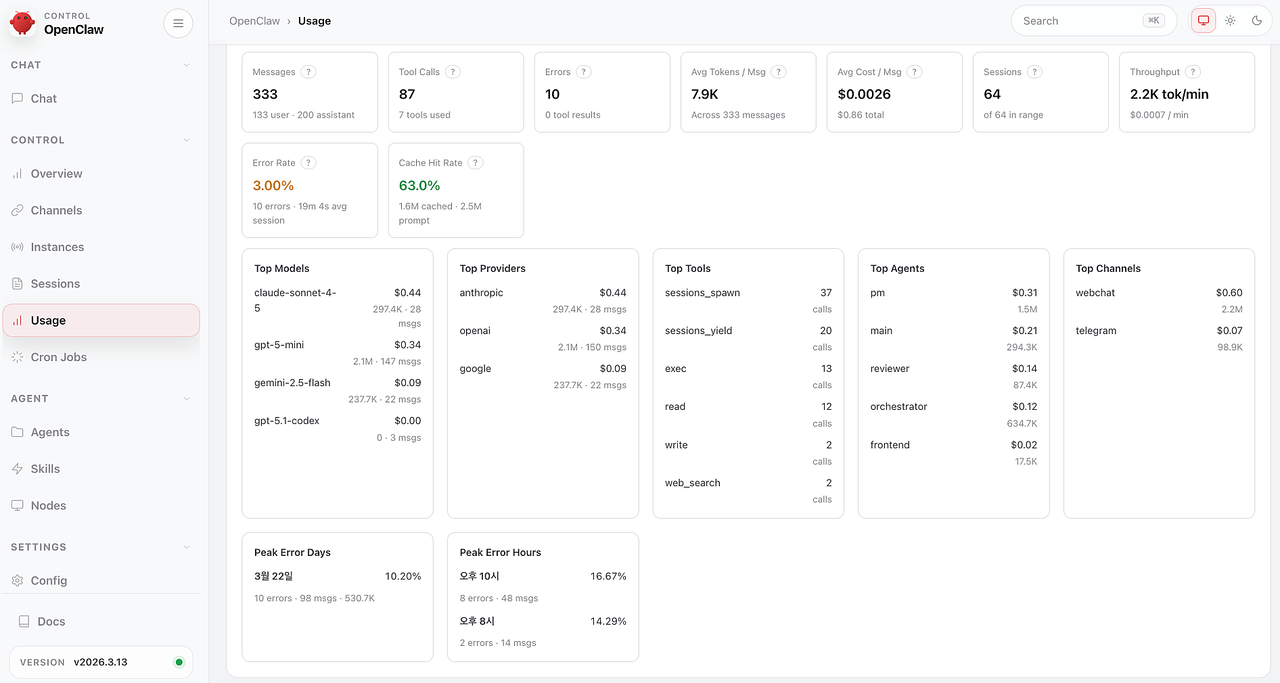
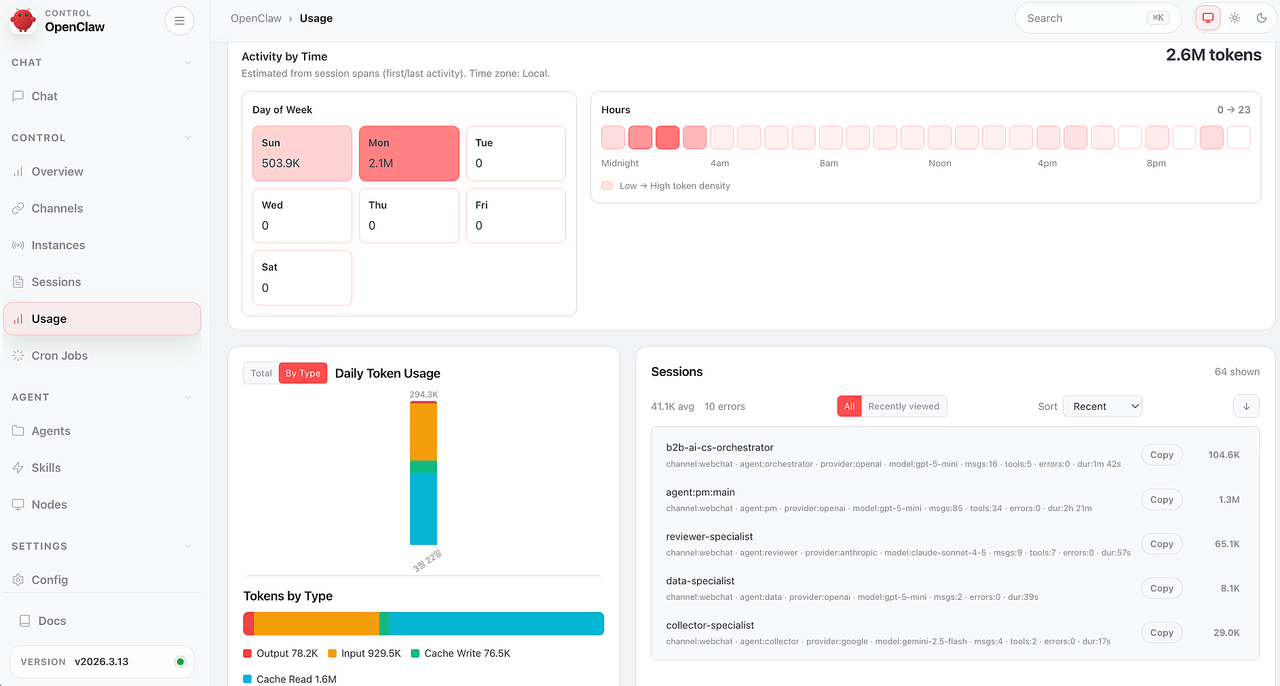
Even with budget-tier models, the costs add up faster than expected. Over two days of fairly aggressive testing, I burned through about $0.90 USD across all three API providers. OpenClaw tends to be token-heavy by design — it sends contextual metadata alongside the actual query, which inflates usage.
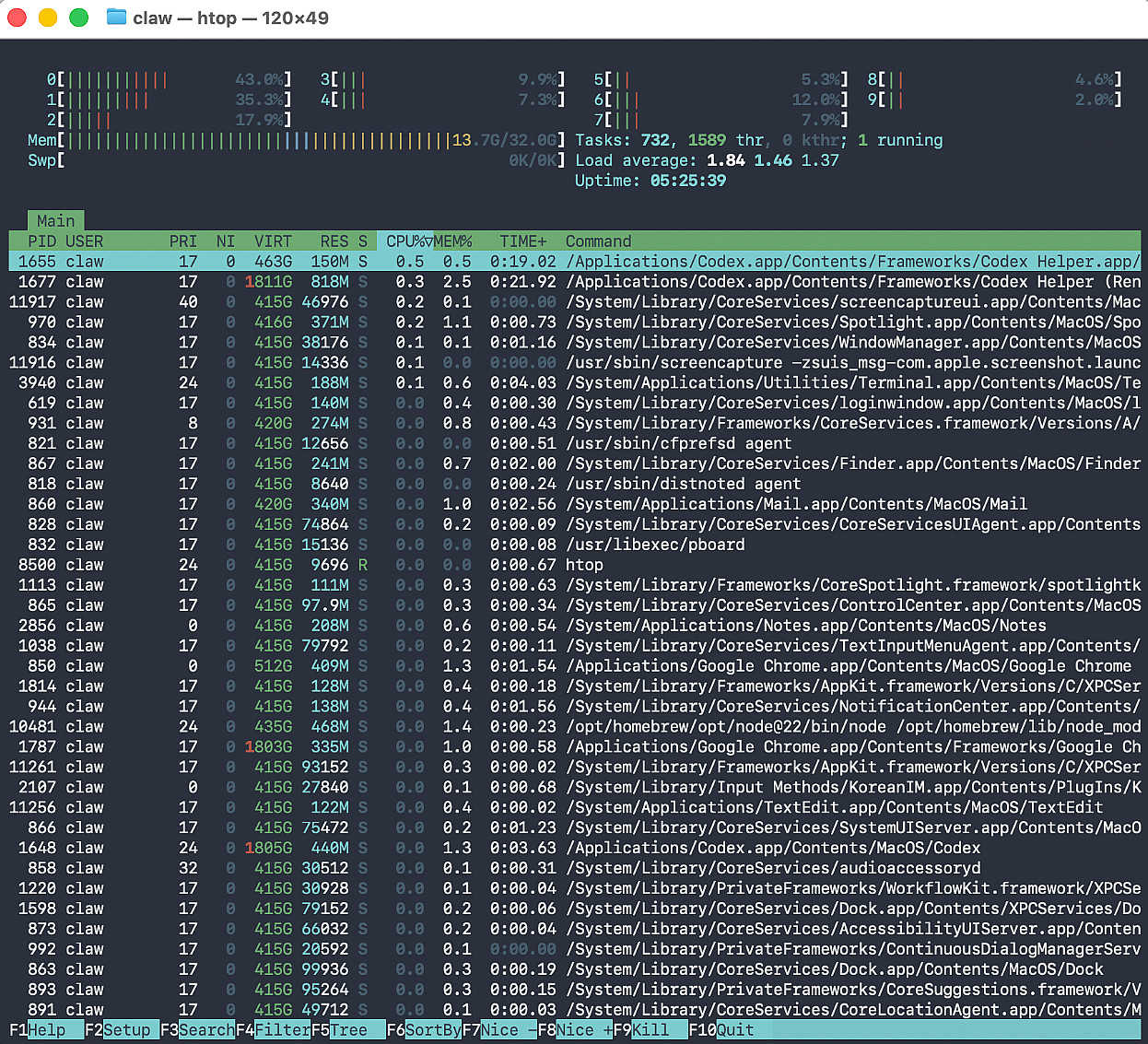
On the hardware side, memory consumption during active orchestration ranged from 10 to 16 GB, which is manageable on 32 GB but worth monitoring if you’re running other services on the same machine.
Takeaways
- Local LLM inference on a Mac Mini M4 (32GB) is viable for small models, but anything near 30B parameters is a non-starter. If local is a must, stay under 13B or look at quantized variants.
- Agent frameworks won’t enforce real delegation unless the architecture explicitly supports it. Always verify that your agents are actually being called, not just simulated by the coordinator.
- Modifying framework internals is sometimes the only path forward, but go in with your eyes open about the maintenance burden.
- Orchestration adds latency and cost. It’s an investment that pays off for complex, multi-step workflows — not a universal upgrade.
- Codex is remarkably effective for this kind of systems-level work. Directing it well still requires understanding the problem space, but the productivity multiplier is real.
This was a weekend project, and there’s still plenty of tuning ahead. If there’s interest, I’ll do a deeper technical writeup covering the specific code changes and session management patterns in detail.
This essay was originally published on Medium and migrated to KanApp Blog.
Comments
Join the conversation
Sign in to leave a comment.
Comment login is being configured.
No comments yet.