

Resolving React Native libsodium CMake Build Errors on Windows
Skip the libsodium nightmare that stumped AI assistants. No WSL or custom builds — just two simple Windows fixes developers wish they knew.
Overview
This guide addresses common build issues encountered when integrating react-native-libsodium into React Native projects, particularly on Windows environments. After extensive troubleshooting with various AI assistants (OpenAI, Claude, Gemini), I found that their suggested solutions often led to unnecessary complexity. This article provides straightforward solutions to avoid common pitfalls.
Environment Setup
The following configuration was used during development:
{
  "react": "19.1.0",
  "react-i18next": "^15.6.0",
  "react-native": "0.80.1",
  "react-native-libsodium": "^1.4.0"
}Platform: Windows development environment
Target: Android build
Issue 1: CMakeLists.txt Path Escape Error
Problem
When running the Android build command, the following error occurs:
> npx react-native run-android
....
> Task :react-native-libsodium:configureCMakeDebug[arm64-v8a] FAILED
C/C++: CMake Warning (dev) in CMakeLists.txt:
C/C++:   No project() command is present.  The top-level CMakeLists.txt file must
C/C++:   contain a literal, direct call to the project() command.  Add a line of
C/C++:   code such as
C/C++:     project(ProjectName)
C/C++:   near the top of the file, but after cmake_minimum_required().
C/C++:   CMake is pretending there is a "project(Project)" command on the first
C/C++:   line.
C/C++: This warning is for project developers.  Use -Wno-dev to suppress it.
C/C++: CMake Error at CMakeLists.txt:34 (add_library):
C/C++:   Syntax error in cmake code when parsing string
C/C++:     D:\App\Release_V1\node_modules/react-native/ReactCommon/jsi/jsi/jsi.cpp
C/C++:   Invalid character escape '\K'.
Root Cause
The issue stems from Windows backslash path separators being incorrectly handled in CMake, causing invalid character escape sequences.
Solution
Modify node_modules\react-native-libsodium\android\CMakeLists.txt with the following configuration:
cmake_minimum_required(VERSION 3.4.1)
project(react_native_libsodium LANGUAGES C CXX)
set(CMAKE_VERBOSE_MAKEFILE ON)
set(CMAKE_CXX_STANDARD 14)
set(CMAKE_CXX_STANDARD_REQUIRED ON)
set(CMAKE_CXX_EXTENSIONS OFF)# NODE_MODULES_DIR must be passed from Gradle with -DNODE_MODULES_DIR=...
if(NOT DEFINED NODE_MODULES_DIR)
message(FATAL_ERROR "NODE_MODULES_DIR is not defined. Pass -DNODE_MODULES_DIR=<path to node_modules> from Gradle.")
endif()# Convert Windows '\' paths to CMake internal representation ('/')
file(TO_CMAKE_PATH "${NODE_MODULES_DIR}" NODE_MODULES_DIR_CMAKE)# Path configurations
set(PROJECT_CPP_DIR "${CMAKE_CURRENT_LIST_DIR}/../cpp")
set(JSI_DIR "${NODE_MODULES_DIR_CMAKE}/react-native/ReactCommon/jsi")
set(REACT_DIR "${NODE_MODULES_DIR_CMAKE}/react-native/React")
set(REACT_BASE_DIR "${NODE_MODULES_DIR_CMAKE}/react-native/React/Base")# libsodium build root directory
set(LIBSODIUM_BUILD_DIR "${CMAKE_CURRENT_LIST_DIR}/../libsodium/build")# Select ABI-specific libsodium build directory
if(${ANDROID_ABI} STREQUAL "arm64-v8a")
set(LIBSODIUM_BUILD_DIR "${LIBSODIUM_BUILD_DIR}/libsodium-android-armv8-a+crypto")
elseif(${ANDROID_ABI} STREQUAL "armeabi-v7a")
set(LIBSODIUM_BUILD_DIR "${LIBSODIUM_BUILD_DIR}/libsodium-android-armv7-a")
elseif(${ANDROID_ABI} STREQUAL "x86")
set(LIBSODIUM_BUILD_DIR "${LIBSODIUM_BUILD_DIR}/libsodium-android-i686")
else()
set(LIBSODIUM_BUILD_DIR "${LIBSODIUM_BUILD_DIR}/libsodium-android-westmere")
endif()# Declare pre-built sodium (.so) as IMPORTED target
add_library(sodium SHARED IMPORTED)
set_target_properties(sodium PROPERTIES
IMPORTED_LOCATION "${LIBSODIUM_BUILD_DIR}/lib/libsodium.so"
INTERFACE_INCLUDE_DIRECTORIES "${LIBSODIUM_BUILD_DIR}/include"
)# Our module (JSI bridge)
add_library(libsodium
SHARED
"${JSI_DIR}/jsi/jsi.cpp"
"${PROJECT_CPP_DIR}/react-native-libsodium.cpp"
"${PROJECT_CPP_DIR}/react-native-libsodium.h"
"${CMAKE_CURRENT_LIST_DIR}/cpp-adapter.cpp"
)# Include directories
target_include_directories(libsodium
PRIVATE
"${PROJECT_CPP_DIR}"
"${JSI_DIR}"
"${REACT_DIR}"
"${REACT_BASE_DIR}"
"${LIBSODIUM_BUILD_DIR}/include"
)# Link libraries
target_link_libraries(libsodium PRIVATE sodium)Important: Clean the build cache before rebuilding:
./gradlew cleanIssue 2: Missing libsodium Build Directory
Problem
After applying the CMakeLists.txt fix, you may encounter this error:
C/C++: CMake Error in CMakeLists.txt:
C/C++: Imported target "sodium" includes non-existent path
C/C++:   "D:/App/Release_V1/node_modules/react-native-libsodium/android/../libsodium/build/libsodium-android-armv8-a+crypto/include"
C/C++: in its INTERFACE_INCLUDE_DIRECTORIES. Possible reasons include:
C/C++: * The path was deleted, renamed, or moved to another location.
C/C++: * An install or uninstall procedure did not complete successfully.
C/C++: * The installation package was faulty and references files it does not provide.
Root Cause
This error occurs because the libsodium prebuilt files haven’t been extracted yet. The package comes with a build.tgz file containing the precompiled libraries.
Solution
Simple approach: Extract the build.tgz file located at:
node_modules/react-native-libsodium/libsodium/build.tgz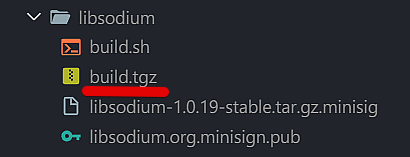
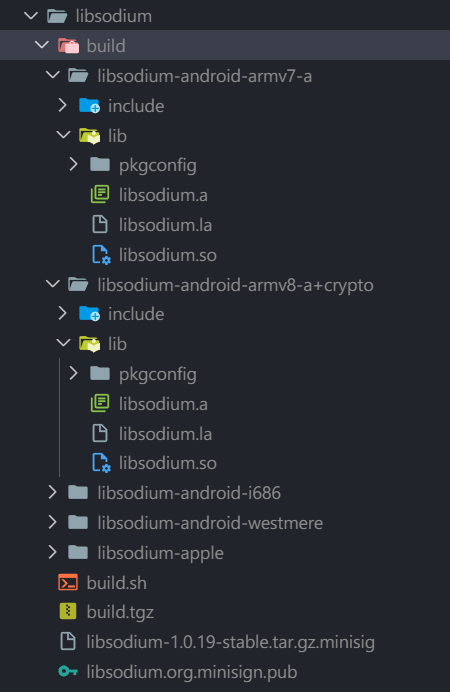
Critical: When extracting on Windows, ensure the directory structure is:
libsodium/
├── build/
    ├── libsodium-android-armv8-a+crypto/
    ├── libsodium-android-armv7-a/
    ├── libsodium-android-i686/
    └── libsodium-android-westmere/
Not the nested structure that Windows might create:
libsodium/
├── build/
    └── build/  # ❌ Incorrect nesting
Alternative Methods (Not Required)
While many guides suggest running build scripts, this is unnecessary for most use cases:
- Linux/macOS:
./build.shin the libsodium directory - Windows: WSL, MSYS2, or Git Bash execution of build scripts
However, simply extracting the provided build.tgz is sufficient and much simpler.
Verification
After successfully applying these fixes, you should see the libsodium .so files generated in your build output:
Troubleshooting Tips
- Always clean build cache before retrying:
./gradlew clean - Verify directory structure after extracting build.tgz
- Check CMake path separators — use forward slashes in CMake configurations
- Ensure NODE_MODULES_DIR is properly passed from Gradle
Conclusion
The react-native-libsodium integration issues are typically straightforward to resolve once you understand the root causes. The key points are:
- Proper path handling in CMakeLists.txt for Windows environments
- Extracting the prebuilt libsodium libraries from build.tgz
- Maintaining correct directory structures
This solution avoids the complexity of setting up separate build environments or compiling libsodium from source, making it ideal for Windows-based React Native development workflows.
A message from our Founder
Hey, Sunil here. I wanted to take a moment to thank you for reading until the end and for being a part of this community.
Did you know that our team run these publications as a volunteer effort to over 3.5m monthly readers? We don’t receive any funding, we do this to support the community. ❤️
If you want to show some love, please take a moment to follow me on LinkedIn, TikTok, Instagram. You can also subscribe to our weekly newsletter.
And before you go, don’t forget to clap and follow the writer️!
This essay was originally published on Medium and migrated to KanApp Blog.



Comments
Join the conversation
Sign in to leave a comment.
Comment login is being configured.
No comments yet.